|
Specification:
- Power Supply: 3.0V to 7.0V
- Power consumption: 0.5mA to 56mA (at 5V when backlight full on)
- Communication mode: UART/I2C/SPI, detect your setting automatically
- Receiving buffer: 2048 bytes
- Work with all microcontroller and microprocessor
- Communication signal can work on 3.3V and 5.0V TTL
- Default setting: UART baud 9600bps, I2C 0x27 address
- UART baud (bps): 300, 1200, 2400, 4800, 9600, 14400, 19200, 28800, 38400, 57600, 115200, 230400, 460800.
- 2MB on board flash chip, provide huge memory space to save user fonts, user data and pictures
|
- Pixels: 160xRGBx128, 262K colors
- View Area:35.0x28.0mm
- Screen size: 36x28.7mm
- Product size: (WxHxD):53x38x5.7mm (2.1X1.5x0.22")
- Simple command sets, easy to remember
- Simple graphic engine integrated
- 7 preloaded fonts, font’s data structure full compatible with U8Glib
- Commands Backward compatible with mono Digole serial display, replace other Digole serial display seamless.
- Special commands to set color and draw color image, you can display 256 color image with 262K true color image on same screen.
|


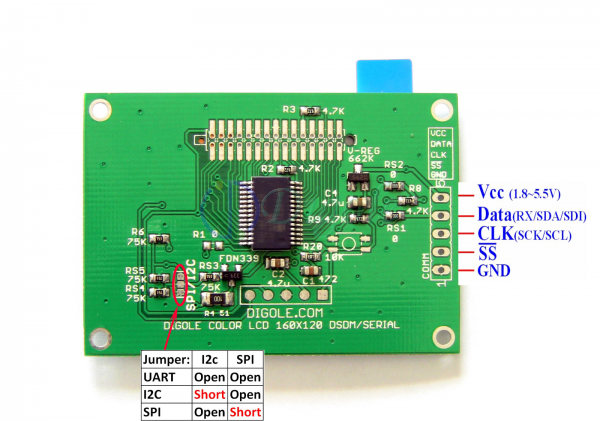

Raspberry Pi demo code (Contribute by Javier Sagrera, Thanks!)
// Pin-out using I2C
// Raspberry Pi -- Digole LCD
// 1 - 3.3.v -- 5 VCC
// 3 - SDA0 -- 4 DATA
// 5 - SCL0 -- 3 SCK
// 6 - GND -- 1 GND
/*
// Communication set up command
* "SB":Baud (ascII bytes end with 0x00/0x0A/0x0D) -- set UART Baud Rate
* "SI2CA":Address(1 byte <127) -- Set I2C address, default address is:0x27
* "DC":1/0(1byte) -- set config display on/off, if set to 1, displayer will display current commucation setting when power on
// Text Function command
* "CL": -- Clear screen--OK
* "CS":1/0 (1 byte)-- Cursor on/off
* "TP":x(1 byte) y(1 byte) -- set text position
* "TT":string(bytes) end with 0x00/0x0A/0x0D -- display string under regular mode
// Graphic function command
* "GP":x(1byte) y(1byte) -- set current graphic position
* "DM":"C/!/~/&/|/^"(ASCII 1byte) -- set drawing mode--C="Copy",! and ~ = "Not", & = "And", | = "Or", ^ = "Xor"
* "SC":1/0 (1byte) -- set draw color--only 1 and 0
* "LN":x0(1byte) y0(1byte) x1(1byte) y2(1byte)--draw line from x0,y0 to x1,y1,set new pot to x1,y1
* "LT":x(1byte) y(1byte) -- draw line from current pos to x,y
* "CC":x(1byte) y(1byte) ratio(byte) -- draw circle at x,y with ratio
* "DP":x(1byte) y(1byte) Color(1byte) -- draw a pixel--OK
* "DR":x0(1byte) y0(1byte) x1(1byte) y2(1byte)--draw rectangle, top-left:x0,y0; right-bottom:x1,y1
* "FR":x0(1byte) y0(1byte) x1(1byte) y2(1byte)--draw filled rectangle, top-left:x0,y0; right-bottom:x1,y1
*/
#include <stdio.h>
#include <stdlib.h>
#include <linux/i2c-dev.h>
#include <fcntl.h>
#include <string.h>
#include <sys/ioctl.h>
#include <sys/types.h>
#include <sys/stat.h>
#include <unistd.h>
int main(int argc, char **argv)
{
int fd;
char *fileName = "/dev/i2c-1"; // Name of the port we will be using, Rasberry Pi model B (i2c-1)
int address = 0x27; // Address of I2C device
char buf[100];
if ((fd = open (fileName, O_RDWR)) < 0) { // Open port for reading and writing
printf("Failed to open i2c port\n");
exit(1);
}
if (ioctl(fd, I2C_SLAVE, address) < 0) { // Set the port options and set the address of the device
printf("Unable to get bus access to talk to slave\n");
exit(1);
}
if (argc>1)
{
sprintf(buf,argv[1]);
//printf("%s %d %s\n",buf,strlen(buf),buf[strlen(buf)]);
if ((write(fd, buf, strlen(buf)+1)) != strlen(buf)+1) {
printf("Error writing to i2c slave\n");
exit(1);
}
} else {
printf(" Simple tool to send commands to Digole graphic adapter\nexamples:\n");
printf(" rpi_lcd \"CLTTHello Word\" - Clear the screen (CL) and prints \"Hello Word\" (TT)\n");
printf(" rpi_lcd \"CC002\" - Draws a cirle at x=30 (0), y=30 (0) with a radio of 32 (2)\n"); //not for Character LCD
}
return 0;
}
Download Programing Manual
Download Arduino lib and demo code
Other lib and sample code
Online tools:
Convert image to Digole(u8g) user fonts
All other online tools from Digole
Watch Arduino Demo Code Video on Youtube
Digole Serial Display List
|


 Free Online Tools
 Resources






 Display Emulator
 256 Color Code
  e-Care
  Trace my order
  Display Manual
  Forum
Forum  Upgrade Firmware
  Arduino Library
  C Library
  Contact us